
How to use random names as practical test data.
1000 Random Names gives you a fast way to fill a design, test a long list, or find a starting point for a fictional character. Choose how many names you need and whether they should come from one country or a mixed set. The generator then builds a unique list in your browser, and any name can be opened as a more detailed fictional profile.
How to generate 1000 random names
The tool has two inputs: How many names? and Choose a country. There is no prompt field, gender filter, meaning filter, or style control. Start by choosing the smallest quantity that matches the job you are doing, then select one country or keep All countries for a mixed result.
- Choose
10,30,100,200,500, or1000names. - Choose a country, or select All countries to mix the eleven available country lists.
- Select Generate names. The page moves to the result grid.
- Use the copy icon on a card when you only need the displayed name.
- Select the name itself when you need a fictional profile with additional sample fields.
The quantity should follow the task rather than the headline number:
| Quantity | Practical use |
|---|---|
| 10 | Checking a compact card layout or collecting a few writing prompts |
| 30 | Filling a small directory, team screen, or contact list |
| 100 | Testing search, sorting, filtering, and pagination states |
| 200 or 500 | Reviewing dense tables and repeated interactions |
| 1000 | Testing a long result set and scanning a broad pool of names |
A set of 1,000 is useful for interface work, but it is not automatically the best choice. Generate 10 or 30 when you are still deciding what the page should look like. Move to 500 or 1,000 when the layout and interactions are ready for a larger data set.
What the country selector changes
The current tool includes the United States, United Kingdom, Canada, Australia, France, Germany, Spain, Japan, China, South Korea, and Vietnam. Selecting a country changes the given-name pool, family-name pool, display order, and the locale used by the fictional profile.
Chinese, Japanese, and Korean results use native characters and join the family name before the given name. Vietnamese results preserve diacritics and place the family name first with a space. Other available countries display the given name before the family name.
The following are illustrative examples assembled from names that exist in the current tool pools. Your generated list will vary because the pools are shuffled each time.
| Country selection | Possible displayed name | What to check in your interface |
|---|---|---|
| United States | Olivia Anderson | Ordinary Latin-script spacing and line length |
| Germany | Emilia Müller | Accented characters in search, sorting, and fonts |
| Japan | 佐藤陽翔 | Native characters and a joined family-first display |
| China | 王欣怡 | Compact native-character names without a space |
| South Korea | 김서연 | Hangul rendering and family-first order |
| Vietnam | Nguyễn Linh | Diacritics and a spaced family-first name |
Choose one country when a prototype has a clear regional context. Choose All countries when you deliberately want to expose typography, search, sorting, and layout assumptions across several writing systems. The mixed option does not model the demographics of a real population; it distributes results across the available country pools.
How to review the generated list
The generator avoids repeated display names within one result set. That does not mean a name is unique in the real world, available as a username, suitable for a legal record, or culturally appropriate for every character. Treat the list as test material or an idea source, then apply the checks that matter to your project.
For product and interface testing, review these points:
- Length: Can the longest names wrap without covering icons or controls?
- Characters: Do accents, Han characters, and Hangul survive search, copy, storage, and export in your own application?
- Order: Does your interface assume every name follows a given-name-first pattern?
- Sorting: Is the result acceptable when your application sorts names using its own locale rules?
- Context: Does a single-country list make more sense than a mixed list for the screen you are building?
For fiction, a generated name is a starting point rather than proof of cultural fit. Check pronunciation, historical period, region, and naming conventions separately. If you are building a fantasy cast rather than sample records, browse the fantasy name generators and choose a focused generator whose controls match the people or creatures in your world.
This tool does not provide meanings, popularity rankings, pronunciation guides, trademark checks, username availability, or evidence that a name belongs to a particular age group. Those questions require separate sources.
Open any name to see a complete fictional profile
Each result card has two separate actions. Select the name card itself to open the Identity details dialog and generate a complete fictional profile for that name. Select the small copy icon in the lower-right corner when you only want to copy the displayed name without opening the profile.
The profile is assembled when the dialog opens. It keeps the selected name and country, then adds fictional details that can be used in a mockup, product demo, interface test, or writing exercise. The page generates these fields locally; it does not look up a real person with the same name.
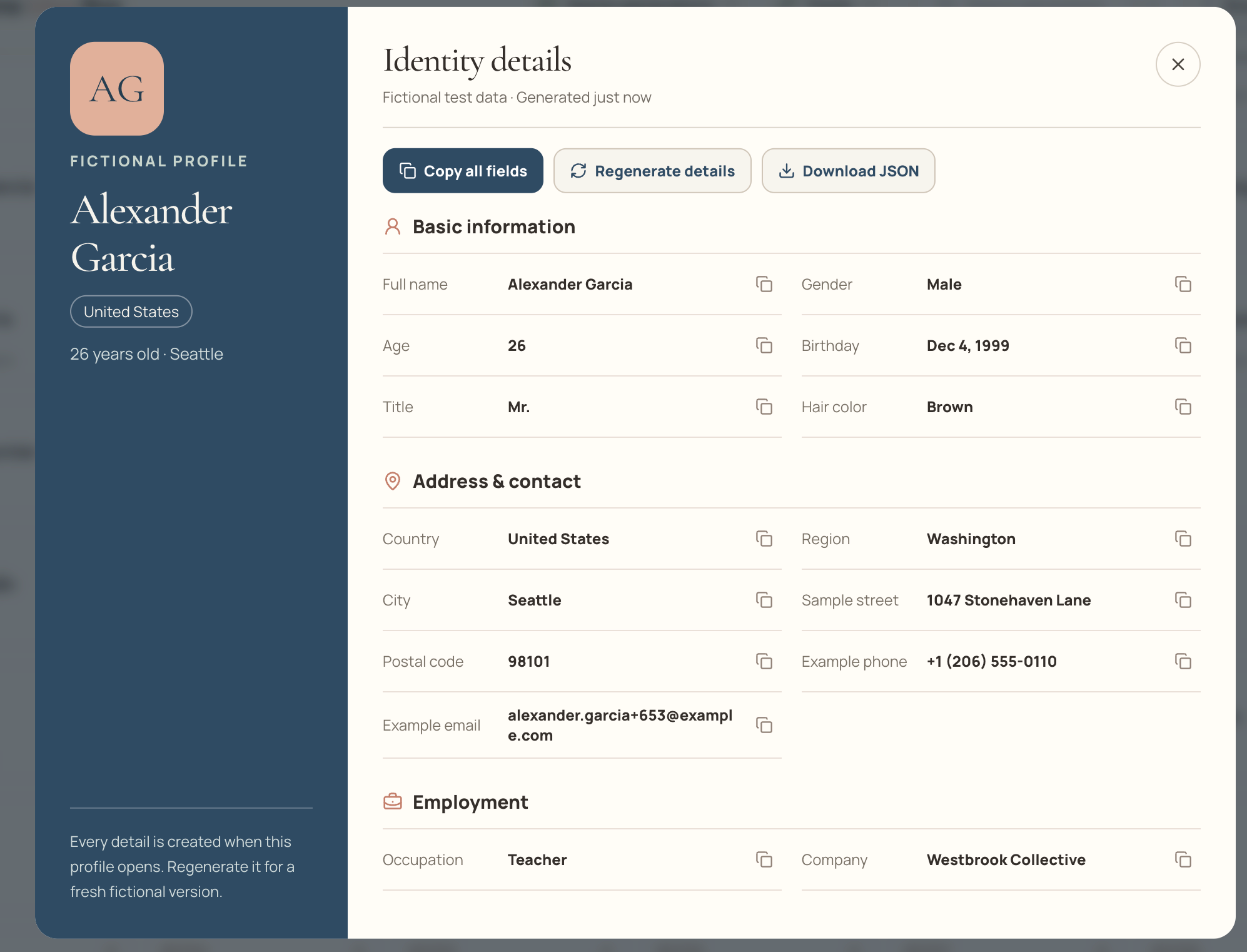
The values shown in this example are fictional. Opening another name, reopening the same name, or regenerating the details can produce different values.
Profile summary
The dark summary panel identifies the active profile before you inspect individual fields. It shows:
- A monogram based on the generated name.
- The Fictional profile label.
- The full name and selected country.
- A generated age and city.
The note at the bottom of the panel is a reminder that the details were created for the current profile and can be regenerated. On a smaller screen, the same information is arranged in a more compact header so the field list has enough room.
Profile actions
The controls above the field list affect the complete open profile:
- Copy all fields copies every visible profile group as labeled plain text. Use this when you need to paste one complete sample record into a document, issue, prompt, or test fixture.
- Regenerate details keeps the selected name but creates another fictional combination of profile values. Use it when the first occupation, location, or other sample fields do not suit the state you are testing.
- Download JSON saves the currently open profile as a structured JSON file. It downloads one profile, not the full generated name list.
- The close button in the upper-right returns you to the name grid without generating a new list.
Information groups
The Identity details area divides the profile into five groups so you can find the relevant test field quickly:
| Group | Included fields |
|---|---|
| Basic information | Full name, generated gender, age, birthday, title, and hair color |
| Address & contact | Country, region, city, sample street, postal code, example phone, and example email |
| Employment | Occupation, company, industry, company size, employment status, and annual salary |
| Test payment | A test card value, test CVC, test expiry, and demo ID |
| Additional details | Username, demo password, height, weight, blood type, education, operating system, GUID, and example website |
Only the Identity details list scrolls when the profile is taller than the dialog. The profile summary, dialog heading, and main action buttons remain available while you move through the groups.
Copying an individual value
Every field row has its own copy icon. Select it to copy only that field’s value, such as the generated city, occupation, email, or GUID. This is different from Copy all fields, which copies the complete profile with its labels and section headings.
Profile details are placeholders. Addresses are assembled examples, contact values use example patterns, and payment fields are explicitly for interface testing. Do not use a generated profile to impersonate a person, create an account, pass identity checks, contact someone, or conduct a transaction.
How this 1000 random name generator compares with alternatives
Different tools solve different versions of the problem. The useful distinction is not which site is universally “best,” but whether you need a large visible list, cultural filters, downloadable bulk data, an API, or a single detailed identity.
| If you need… | This page | A relevant alternative |
|---|---|---|
| A visible list of up to 1,000 names | Generates 10–1,000 unique displayed names in one grid | Fakenamely documents generation of up to 100 names and includes CSV/JSON export |
| Broad naming traditions and category controls | Offers eleven country selections without gender or category filters | Behind the Name provides gender, surname, category, rarity, diminutive, and life-story options |
| A detailed identity reached from a large name list | Opens a fictional profile from any result without leaving the list | Fake Name Generator focuses on generating a detailed identity from name-set, country, and gender choices, with bulk generation handled separately |
| Programmatic user records | Has no API; generation happens through the page interface | Random User Generator is API-oriented and documents JSON, CSV, YAML, and XML responses |
The concrete advantage here is the transition from a large browsable list to an individual profile: you can inspect many names first, then create richer sample data only for the entries you choose. The trade-off is equally concrete. This page has fewer filters than Behind the Name, no bulk list export like Fakenamely, and no developer API like Random User Generator.
Common problems and practical fixes
The names do not match my project’s region
Generate again with one country selected instead of All countries. The mixed setting is designed to vary scripts and locales, not to represent one real audience.
A name looks plausible, but I am not sure it is appropriate
Treat the result as an idea to investigate. This page does not verify meaning, pronunciation, age distribution, ethnicity, or historical usage. For important cultural or personal decisions, confirm the name with authoritative language references or a knowledgeable speaker.
Opening the same name gives me different details
That is expected. Profile fields are generated when the profile opens, and Regenerate details intentionally creates another fictional version. Download the JSON or copy the fields when you need to keep one version.
I need the same 1,000 records in every test run
This tool does not support seeded or deterministic generation. Capture the records you need after generation, or use a fixture file in your own project when repeatability is required.
I need to export the complete name list
Bulk list export is not currently available. You can copy names individually and download an opened profile as JSON. Choose a tool with documented bulk export or API support when your workflow depends on transferring the entire generated set.